AI use spreads through a company like wildfire: personal API keys in scripts, model calls in new features, coding agents on laptops, AI built into everyday SaaS tools. Each opens another route for company data to reach a provider, with its own bill and logs, if it has logs at all. And surveys suggest this is the norm. In Microsoft and LinkedIn's 2024 Work Trend Index, 78% of AI users said they bring their own AI tools to work. In IBM's 2026 Cost of a Data Breach research, only 40% of organisations reported using access controls on AI models and data.
An AI gateway brings the API traffic you route through it under one set of controls. The challenge is putting one in place without pushing people back to their personal keys.
What is an AI gateway?
An AI gateway is a single control point between the people and systems that use AI and the providers that serve it. On one side are internal apps, agents, coding tools, and employees. On the other are hosted model APIs, cloud platforms such as Bedrock or Vertex AI, private models, and increasingly MCP servers. Every request passes through the gateway, which decides who may call which model, records what happened, and applies policy on the way through.
It is also called an LLM gateway, and Gartner now publishes a Market Guide for AI Gateways. We use "AI gateway", or "gateway" for short, for the role, whichever product fills it.
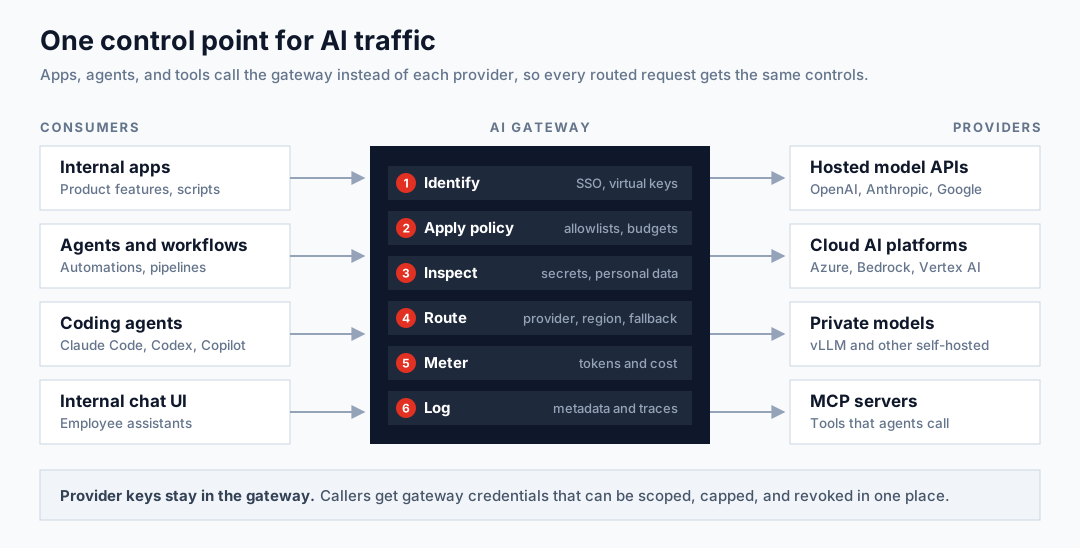 Internal apps, agents and workflows, coding agents, and internal chat UIs call an AI gateway, which identifies the caller, applies policy, inspects the payload, routes, meters tokens and cost, and logs metadata before forwarding to hosted model APIs, cloud AI platforms, private models, and MCP servers.
How it differs from a classic API gateway
Many organisations already run an API gateway, and several AI gateways are built on one. The differences come from what flows through:
| Classic API gateway | AI gateway | |
|---|---|---|
| Unit of cost | Requests | Input, output, and cached tokens, priced per model |
| Payload | Structured, often schema-validated | Natural-language prompts and responses that may contain personal data, secrets, or client data |
| Traffic shape | Short request–response | Long streamed responses and agent sessions made of many calls |
| Routing | By path or service | By model, provider, region, and cost, with fallback across providers whose APIs differ |
| Upstream | Your own services | Third parties you pay per token |
A request limit doesn't stop a team from spending a month's budget in an afternoon, because one request can cost a fraction of a cent or several dollars. A gateway has to count tokens, read the payload, and handle streaming without breaking it.
Why enterprises need one
Shadow AI and personal keys
Personal accounts and keys are where most companies start. Moving to corporate AI plans fixes the contract, but not the API traffic. IBM reports that incidents involving unapproved AI tools affected 43% of organisations in its 2026 study.
Provider keys also leak. GitGuardian's 2026 State of Secrets Sprawl found leaks of AI-service secrets on public GitHub up 81% year on year. With a gateway, provider keys stay on the server. Developers get gateway credentials that can be scoped, capped, and revoked in one place.
Spend visibility and attribution
Enterprise spending on generative AI has grown quickly: Menlo Ventures estimates $37 billion in 2025, up from $11.5 billion in 2024, across US enterprises.
Provider dashboards show spend per key or project, for one provider at a time. A gateway can attribute every call to a team, application, and person across all providers, which is what chargeback and budgeting need.
Data leaving the boundary
Prompts carry whatever people paste into them. Harmonic Security found sensitive content in 4.37% of the prompts it analysed in its customers' browser traffic. Samsung's 2023 incident, in which engineers pasted internal source code into ChatGPT, is still the standard example. OWASP lists Sensitive Information Disclosure as LLM02 in both the 2025 and 2026 editions of its Top 10 for LLM Applications.
A gateway is the place to detect personal data and secrets, enforce region rules, and block providers that haven't been approved.
Audit and compliance evidence
Auditors ask who used which model, with what data, under what controls. Under Article 26(6) of the EU AI Act, deployers of high-risk systems must retain automatically generated logs under their control for a period appropriate to the system's purpose, of at least six months, unless applicable EU or national law provides otherwise. After the 2026 Digital Omnibus, most stand-alone high-risk obligations apply from 2 December 2027. ISO/IEC 42001, SOC 2, and Singapore's agentic AI framework all expect access control and monitoring that you can show evidence for. Our compliance standards overview covers what each requires. A gateway produces much of that evidence as a side effect.
OWASP also lists Unbounded Consumption as a top risk: LLM06 in the 2026 edition, LLM10 in 2025. An agent stuck in a loop is a security and cost problem at the same time.
Provider lock-in and outages
Applications that call one provider's SDK directly are tied to that provider's availability, rate limits, and pricing. A gateway presents one interface. Switching models, adding a fallback, or moving a workload to a private model becomes a change to the gateway's configuration rather than to every application.
What a gateway controls
Access and identity
- Identity. Callers authenticate with SSO (OIDC or SAML), workload identity, or a JWT, so each request is tied to a person or service.
- Virtual keys. The gateway issues its own keys per user, team, or application, while the real provider keys stay in its secret store. When someone leaves, you revoke one credential.
- Allowlists. Each team or key gets a list of models and providers it may use. Expensive frontier models can go to the teams that need them, and an unapproved provider can be blocked outright.
- Tools. Many gateways now also front MCP servers, controlling which tools an agent can call as well as which model it can reach.
In several open-source gateways, SSO, RBAC, and audit logs are part of the paid enterprise tier, so check what's included before choosing.
Cost and quotas
- Token limits. Limits in tokens per minute or per day, set per key, team, or model, protect shared capacity from one heavy user.
- Budgets. Spend caps per key, team, or project reset over a set period. Check whether a control only alerts or also rejects requests, and how it handles requests already in flight. OpenAI's project limits return
429once reached when "Enforce a hard limit" is enabled; spend alerts alone do not stop traffic, and hard-limit enforcement can lag slightly. Vercel calls its gateway budgets soft caps because a request that crosses the limit can finish, but subsequent requests are rejected. - Chargeback. Tag every request with team, application, and environment so spend can be allocated without manual reconciliation.
- Alerts. Alert on unusual spend before a budget runs out, not after.
Provider-native controls are a useful baseline:
- OpenAI: projects with spend alerts and optional hard limits.
- Anthropic: workspaces with spend and rate limits.
- AWS Bedrock: application inference profiles with cost-allocation tags.
A gateway brings these separate budgets and limits into one place.
Data protection
- Detection and redaction of personal data, credentials, and client identifiers in prompts and responses. Products here include Kong's AI Sanitizer, Bedrock Guardrails (its
ApplyGuardrailAPI works without a Bedrock model), Apigee's Model Armor policies, and Cloudflare AI Gateway DLP. - Region and residency rules. Route to approved regions only. OpenAI sets data residency per project, and Anthropic workspaces can restrict inference geography.
- Provider policy. Block providers without a data processing agreement, and require zero-data-retention routes where contracts allow.
Inspection has costs. Rewriting a request body can break clients that depend on exact payloads, which coding agents do. Synchronous response inspection buffers chunks or the full response before releasing them, adding latency. Asynchronous inspection can forward chunks immediately, but sensitive or unsafe content may reach the user before detection. Bedrock Guardrails documents both modes; Cloudflare's DLP response scanning buffers the full response. Start by detecting and flagging, and block only categories you can detect reliably, such as secrets and card numbers.
Routing and resilience
- One interface. Most gateways expose an OpenAI-compatible API, and many now pass through Anthropic's Messages API as well.
- Fallbacks and load balancing across providers, regions, and deployments, with circuit breakers that respect a provider's
Retry-After. - Caching. Exact-match caching can reduce cost, but safe reuse depends on tenant and access isolation, cache keys that capture the relevant request context, and suitable expiry rules. Semantic caching returns stored answers to similar prompts, which adds the risk of reusing an answer in the wrong context. LiteLLM's own docs note it works poorly for agent traffic. Both kinds of cache need isolation: scope reuse to callers with the same data access, or don't cache those responses.
- Private and hosted models behind the same interface, so sensitive workloads can go to a privately hosted model without client changes.
Observability and audit
Log metadata for every request: caller, team, application, model, provider, region, token counts, cost, latency, status, and the policy decisions applied. That covers most cost, capacity, and audit questions.
Prompt and response bodies are a different decision. Logging them helps debugging and investigations, but it creates a second store of exactly the data you're trying to protect. If you keep them, set a short retention period, restrict access, and redact what you can. Treat that store as being in scope for your data-protection controls.
For agents, a single task becomes dozens of model and tool calls. Group them with a session or trace ID so you can follow one task end to end. Most gateways export OpenTelemetry. The GenAI semantic conventions are still in Development status, so expect attribute names to change.
Where gateways sit in the architecture
A gateway’s position in the architecture determines which traffic it can inspect and control:
| Option | Examples | Sees | Misses |
|---|---|---|---|
| Network egress / SSE proxy | Zscaler, Netskope, Palo Alto Networks, Cloudflare One, Microsoft Purview | Traffic from managed devices and networks, including browser chat and AI in SaaS tools (with TLS inspection) | Personal devices; tokens and cost; per-application context |
| Self-hosted gateway | LiteLLM, Portkey, Bifrost, Agent Router, Kong, APISIX | API traffic you route to it; full prompt context, tokens, cost | Anything that calls providers directly |
| Cloud-provider gateway | Azure API Management, Apigee, Bedrock features, Databricks Unity Gateway | API traffic in that cloud; native identity and billing | Traffic in other clouds and on laptops, unless routed in |
| SaaS gateway | Cloudflare AI Gateway, Vercel AI Gateway, OpenRouter, TrueFoundry | API traffic you route to it; quick to set up | The same as self-hosted, plus it adds a third party to your data flow |
Some traffic stays outside the AI gateway unless the tool supports routing it there:
- Browser chat, such as ChatGPT or Claude on the web.
- AI built into SaaS tools, which calls the vendor's model from the vendor's servers.
- Vendor-hosted agents, such as cloud coding agents running in the vendor's infrastructure.
- Features tied to a vendor's own service, such as tab completion in Cursor and default GitHub Copilot.
- Agent sessions using a provider's default endpoint rather than a configured gateway. Subscription sign-in alone does not determine the route: Codex can combine ChatGPT sign-in with gateway routing, and Claude Code can send subscription-authenticated traffic through a gateway.
These need corporate plans with admin controls, egress controls on managed devices, and the vendors' audit APIs. In practice, enterprises run two layers: an AI gateway for traffic they own, and egress controls for everything else.
Tooling landscape
The market changes quickly:
- Acquisitions. Palo Alto Networks completed its acquisition of Portkey in May 2026. Mintlify acquired Helicone in March 2026 and put it into maintenance mode.
- Archived and renamed projects. TensorZero's repository is archived. Envoy AI Gateway is now Agent Router, an Agentic AI Foundation project.
- Security incidents. LiteLLM had two supply-chain compromises in 2026: malicious PyPI releases in March, and a malicious release on PyPI, GHCR, and Docker Hub, including the
latesttag, on 21 October.
Check ownership, maintenance status, and release security before committing to a tool. The comparison below was reviewed in November 2026; plan boundaries and features can change.
Open source and self-hosted
| Gateway | Licence | Included free | Paid tier adds | Keep in mind |
|---|---|---|---|---|
| LiteLLM Proxy | MIT core | Virtual keys; budgets and token limits per key, user, and team; caching; OpenTelemetry; MCP gateway | SSO/SCIM, RBAC, audit logs, per-model budgets | Widest provider coverage; pin versions after the 2026 compromises |
| Portkey Gateway | MIT core | Universal API, retries, fallbacks, load balancing, routing, guardrails | Budgets, usage policies, semantic cache, SSO, SCIM, RBAC, audit logs; availability varies by plan | Now part of Palo Alto Networks' Prisma AIRS; distinguish the open-source proxy from the commercial platform |
| Bifrost | Apache-2.0 | Virtual keys, budgets, fallbacks, semantic cache, MCP gateway | Guardrails, SSO, RBAC, audit logs, clustering | Written in Go, with a focus on low overhead |
| Agent Router (formerly Envoy AI Gateway) | Apache-2.0 | 16 providers, token rate limits and quotas, failover, MCP routing with per-tool authorisation | No commercial tier documented | Built on Envoy; suits teams already running it |
| Kong AI Gateway | Kong licence | AI proxy, multi-provider routing | Token rate limiting, semantic cache; Konnect AI plans | Natural fit if Kong already fronts your APIs |
| Apache APISIX | Apache-2.0 | Multi-provider proxy with fallback, token rate limits, prompt guard | None | Fewer AI-specific features |
Cloud-native and SaaS
| Gateway | Model | Notable controls | Keep in mind |
|---|---|---|---|
| Azure API Management | Azure service | Token limits and quotas, token metrics for chargeback, semantic cache, Content Safety, MCP | Feature availability varies by tier |
| Apigee | Google Cloud service | Token limit and quota policies, semantic cache, Model Armor sanitisation, MCP | Suits teams already on Apigee |
| AWS Bedrock | AWS features | Application inference profiles for cost tags, Guardrails | No native multi-provider gateway; AWS's reference architecture deploys LiteLLM |
| Databricks Unity Gateway | Databricks platform | Rate limits, budgets, usage tables, MCP governance, coding-agent routing | Guardrails still in beta |
| Cloudflare AI Gateway | SaaS | Analytics, caching, rate limits, fallbacks, DLP | Core features free; DLP buffers streams and doesn't scan cache hits |
| Vercel AI Gateway | SaaS | Budgets per team, project, or key; fallbacks; request logs | Budgets reject subsequent requests after exhaustion but allow the request crossing the cap to finish; BYOK spend is excluded |
| OpenRouter | SaaS | Per-key budgets, model and provider allowlists, zero-retention routing, PII redaction | Platform fee on credits |
| TrueFoundry | SaaS, hybrid, or self-hosted | Budgets, rate limits, guardrails, semantic cache, MCP gateway | Per-user pricing on paid tiers |
A rough guide:
- Already on Azure or Apigee: start with the gateway you have.
- Multi-cloud teams, or teams that want full control: a self-hosted open-source gateway.
- Fastest start, if a third party in the data path is acceptable: a SaaS gateway.
- Narrow scope, or requirements no product meets: build your own, or build on existing parts.
Building your own gateway
The core of a gateway is small. A proxy that checks a key, forwards the request, and records token usage takes a few dozen lines. The products are large because of everything around that core: many providers and API formats, streaming edge cases, budgets under concurrency, admin interfaces, and keeping up with providers' release pace.
Pros and cons of building
What you gain:
- Policy that fits your organisation. Entitlements, budgets, and data rules can come straight from your identity provider, finance system, and data classification, without waiting for a vendor to support them.
- Only what you need. A gateway for one or two providers can have a handful of dependencies and a small attack surface. After the 2026 LiteLLM compromises, a smaller supply chain is worth something.
- No paid tier for the basics. SSO, RBAC, and audit logs are often enterprise features in open-source gateways. In your own build, they cost engineering time, not licence fees.
- The passthrough behaviour you choose. You decide exactly what the gateway inspects, logs, and leaves untouched, which matters for coding agents.
- No third party in the data path. Prompts reach only the providers you've approved.
What it costs:
- Far more code than the core suggests. The sketch below is under 70 lines. Our reference build, described further down, is about 7,500 lines of Python plus 5,700 lines of tests, for one API format and two providers, and it's still a long way from being production-ready.
- Keeping up with providers. New models, API changes, beta headers, and price changes all become your backlog. A gateway that falls behind pushes developers back to personal keys.
- Operations and security. You run a high-availability service that holds every provider key, and you patch it, monitor it, and answer for it in audits.
- Features you'd get for free elsewhere. Broad provider coverage, fallbacks across API formats, caching, admin interfaces, and MCP governance all have to be built or done without.
- A team to own it. It needs maintainers for as long as it runs. If the people who built it move on, it becomes an unmaintained service in the path of every AI request.
When building makes sense
- Narrow scope. One or two providers, internal applications only, and no need to support every coding agent.
- Requirements no product meets. An air-gapped environment, entitlements tied to your own systems, or data classification rules that depend on internal services.
- A platform your team already uses. If Envoy, Kong, or APISIX already fronts your APIs, the gateway can be a policy layer on top rather than a new service.
If none of these apply, adopt a product. The most common middle path is to use an existing gateway as the data plane (the proxy that handles every request) and build your own control plane on top: key issuance tied to your identity provider, budgets from your finance system, and chargeback reports. LiteLLM, for example, has a key-management API that a control plane can call. Envoy's external authorisation filter can send each request to your own policy service before forwarding it.
The parts of a gateway
On the request path:
- Identify. Resolve the credential to a principal: a person or service, with its team, application, allowed models, and budget.
- Check policy. Apply the model allowlist, remaining budget, token rate limits, and data checks before any money is spent.
- Route. Map the model name to a provider deployment, swap in the real provider key, and fall back on errors.
- Relay. Stream the response back without buffering it.
- Meter. Read token usage from the response and price it.
- Log. Write metadata to your logging and tracing systems.
Off the request path, a control plane holds the keys, budgets, model catalogue, and price table, with an admin interface and reports.
A minimal gateway
Here's the smallest useful version: a gateway for Anthropic's Messages API, in Python with FastAPI and httpx. It passes bytes through unchanged, which coding agents need, and reads token usage on the way. lookup_virtual_key and record_usage stand in for your key store and usage log.
# Illustrative only: a minimal gateway for Anthropic's Messages API.
# Production gateways also need retries, fallbacks, token counting, HA, and tests.
import json
import os

import httpx
from fastapi import FastAPI, HTTPException, Request
from fastapi.responses import StreamingResponse

UPSTREAM = "https://api.anthropic.com/v1/messages"
FORWARDED = ("anthropic-version", "anthropic-beta", "content-type")

app = FastAPI()
client = httpx.AsyncClient(timeout=httpx.Timeout(600, connect=10))


@app.post("/v1/messages")
async def messages(request: Request):
    # 1. Identify: map the virtual key to a team, model allowlist, and budget.
    principal = lookup_virtual_key(request.headers.get("x-api-key"))
    if principal is None:
        raise HTTPException(401, "Unknown key")

    # 2. Check policy before spending anything.
    body = await request.body()
    model = json.loads(body).get("model")
    if model not in principal.allowed_models:
        raise HTTPException(403, f"{model} is not allowed for this key")
    if principal.spent >= principal.budget:
        raise HTTPException(429, "Budget exhausted")

    # 3. Route: swap in the real provider key; forward headers unchanged.
    headers = {h: request.headers[h] for h in FORWARDED if h in request.headers}
    headers["x-api-key"] = os.environ["ANTHROPIC_API_KEY"]
    upstream = await client.send(
        client.build_request("POST", UPSTREAM, content=body, headers=headers),
        stream=True,
    )
    is_stream = upstream.headers.get("content-type", "").startswith("text/event-stream")

    # 4. Relay the bytes untouched, reading token usage as they pass.
    async def relay():
        usage, pending = {}, b""
        try:
            async for chunk in upstream.aiter_bytes():
                yield chunk
                pending += chunk
                if is_stream:
                    *lines, pending = pending.split(b"\n")
                    for line in lines:
                        if line.startswith(b"data:"):
                            event = json.loads(line[5:])
                            message = event.get("message") or {}
                            usage.update(event.get("usage") or message.get("usage") or {})
            if not is_stream and upstream.is_success:
                usage = json.loads(pending).get("usage", {})
        finally:
            await upstream.aclose()
            # 5–6. Meter and log metadata only, never prompt or response bodies.
            record_usage(principal, model, upstream.status_code, usage)

    return StreamingResponse(
        relay(),
        status_code=upstream.status_code,
        media_type=upstream.headers.get("content-type"),
    )
In a stream, Anthropic reports input and cache tokens in the message_start event and cumulative output tokens in message_delta. Keeping the latest values gives the final count.
The hard parts
- Usage in streams. Each provider reports it differently. OpenAI's Chat Completions API only includes usage in a stream when the client sets
stream_options.include_usage, and adding it at the gateway means modifying the request. If a client disconnects mid-stream, the provider may still bill for tokens it generated. - Budgets under concurrency. The cost is only known when a response completes. Many long agent streams that start under budget can finish well over it. Reserve the estimate, then reconcile the actual cost.
- Pricing. Keep a price table per model for input, output, cache reads and writes, batch discounts, and regional premiums, and update it whenever providers change prices.
- API surface. Provider APIs and features keep changing. Translation adds bugs; preserve provider formats where possible.
- Operations. High availability, secrets management, patching, and the security of a service that holds every provider key are all your responsibility.
- Ownership. A gateway is a product with internal users. Without a team keeping it current, developers will go around it.
Example: a reference gateway
To test the claims in this article against working code, we built a small gateway and published it as VGTechConsulting/api-gateway, under the MIT licence.
Demo only. The repository exists to support this article. It isn't intended for production use and comes with no support or stability guarantees. Read it, run it locally, and experiment with it, but don't put it in front of real traffic.
It takes the minimal gateway above and works through the hard parts for a narrow scope: Anthropic's Messages API format, with Anthropic and DeepSeek (through its Anthropic-compatible endpoint) as providers.
- Attribution. Virtual keys carry an owner, team, application, and environment, with a model allowlist and request and token rate limits.
- Budgets under concurrency. Each request reserves an estimated cost when admitted and settles the real cost when it completes. Budgets apply per key and per team, across both providers, and overruns are recorded rather than hidden.
- Passthrough. Requests and responses are relayed byte for byte, streamed or not, so Claude Code works with
ANTHROPIC_BASE_URLpointed at the gateway. - Metering. Token usage, including cache reads and both cache-write durations, is read from responses and priced from a table that refuses to load until every placeholder price is replaced with a verified one.
- Observe, then enforce. Allowlists, rate limits, and budgets each run in
observeorenforcemode, per team, and observed policies report what they would have denied. This is the rollout plan below, in code. - Detection without modification. Private keys, cloud keys, API tokens, and card numbers are detected in requests and either flagged or blocked per category. Detection never rewrites the request.
- Metadata-only logs. Prompts and responses are never logged. A CLI and a read-only report UI show spend by team, model, and provider, chargeback, budgets, and gateway overhead.
 OpenCode switching between Claude Sonnet 5.5 and DeepSeek Flash through the reference gateway, followed by the gateway's report UI showing both providers' token usage, calculated costs, and shared team budget
Its documented limits are as instructive as its features: one replica only, because rate windows and reservations live in memory; no SSO or SCIM; no admin interface; no translation between API formats; and budgets that are estimated admission controls rather than billing ceilings. Closing each of those gaps is a project of its own, and it's most of what separates a demo from the products in the tables above.
Build where your requirements are unusual, and use existing components for the rest.
Gateways and coding agents
Coding agents are often the heaviest AI users in an engineering organisation, and the hardest to route. Each tool has its own configuration, and some features depend on the vendor's own backend.
| Agent | How to point it at the gateway | What stays outside |
|---|---|---|
| Claude Code | ANTHROPIC_BASE_URL plus a gateway credential or apiKeyHelper, distributed through managed settings | Web, Slack, and other vendor-hosted sessions |
| Codex CLI | A model_providers entry with base_url in config.toml; supports ChatGPT sign-in alongside gateway authentication; admins can manage config centrally | Voice, workspace sign-in, MCP and plugin traffic can use separate paths |
| Gemini CLI | GOOGLE_GEMINI_BASE_URL or GOOGLE_VERTEX_BASE_URL | Sign-ins with personal Google accounts |
| GitHub Copilot | Bring-your-own-key (public preview), including OpenAI-compatible endpoints | Inline completions, embeddings, and default Copilot models |
| Cursor | Custom API keys for chat models | Tab completion; requests still pass through Cursor's servers |
For Codex, project-local configuration cannot override sensitive provider or authentication routing settings. Use managed configuration to roll out and enforce the gateway route.
Claude Code's gateway documentation describes three common problems:
- Credentials. Setting only
ANTHROPIC_BASE_URLisn't enough. If a developer is still signed in with a claude.ai subscription, traffic passes through the gateway but stays billed to the subscription. To lock it down, setallowedProvidersto["customEndpoint"]and put the gateway's URL in managed settings. Claude Code then refuses any other destination (v2.1.285 or later). - Headers and body fields. The gateway must forward
anthropic-versionandanthropic-betaunchanged. If it strips a beta header but passes the body field, requests fail. Prompt caching has no beta-header requirement: preserve the request body'scache_controlfields, or costs can quietly go up. - Inspection. The docs advise gateways to inspect without modifying. Body rewriting for redaction breaks features, a WAF rule can block code that looks like an attack, and TLS-inspecting proxies need their certificate trusted through
NODE_EXTRA_CA_CERTS.
Anthropic now also ships a self-hosted Claude apps gateway with SSO sign-in and OpenTelemetry metrics, as an alternative to a general-purpose gateway for Claude traffic.
For the wider compliance questions coding agents raise, from data flow to output provenance, see our AI coding agents compliance framework.
Trade-offs and pitfalls
Latency. Vendors publish overhead figures from their own benchmarks:
- LiteLLM reports about 8 ms at p95.
- Bifrost claims microseconds.
- Kong has published comparisons with competitors.
These figures come from different workloads, hardware, and configurations. Some tests use mock providers to isolate gateway overhead. LiteLLM also documents tests with budgets, token counting, spend tracking, and metrics enabled; Bifrost distinguishes mock-provider overhead measurements from its OpenAI load test. Guardrails, DLP buffering, and logging can add latency. Measure with your own workload and policies enabled.
Single point of failure. If the gateway goes down, all AI traffic stops. Run several instances with health checks, and decide per policy whether it fails open or closed.
A high-value target. The gateway holds every provider key and, possibly, every prompt. Pin versions, verify images and packages before upgrading, keep the admin interface off the public internet, and store provider keys in a secrets manager. The 2026 LiteLLM compromises show why.
Prompt logs as a new data store. See observability above. The logs need the same protection as the data in them.
Developer friction. If the gateway is slower, lags behind new models, or breaks agent features, people go back to personal keys and you lose the visibility you set out to gain. Keep the model list current, make keys self-service, and treat the gateway as a product with internal users.
Feature lag. Providers ship new APIs and beta features constantly. A gateway that only understands one API format, or that rewrites requests, will fall behind. Prefer passthrough modes for the clients that need them.
Lock-in to the gateway. Keep routing, budgets, and policies as configuration in version control, so moving to another gateway is a migration, not a rebuild.
How to roll one out
Observe first, then enforce. Start with access and spend, and add data controls once you know what the traffic looks like.
- Take inventory. Gather provider invoices and key lists, and check SSE or CASB discovery reports. Find out which teams call which providers and with whose keys. Expect surprises.
- Observe. Deploy the gateway in passthrough mode with metadata logging only. Route new applications and one willing team through it. Move provider keys into the gateway's secret store and issue virtual keys.
- Control access and spend. Turn on SSO and per-team model allowlists. Set budgets as alerts first, then as hard limits once you know normal usage. Distribute coding-agent configuration through managed settings. Rotate and revoke direct provider keys as each team moves over.
- Add data controls. Run detection in flag-only mode, tune false positives with the teams affected, then block high-confidence categories. Add region routing where contracts or regulation require it.
- Close the gaps. Block direct calls to provider APIs from managed networks except from the gateway. Cover browser and SaaS use with corporate plans and egress controls. Review usage, spend, and policy exceptions every quarter.
Track a few outcomes: the share of AI API traffic that goes through the gateway, the share of spend you can attribute to a team, and how many requests policy blocks. A rising block count can mean the policy is working, or that it's too strict and pushing people around the gateway.
At VG Tech Consulting, we help teams map their AI traffic, choose a gateway, and roll it out without slowing developers down.
Sources
Sources checked in November 2026. Vendor benchmarks and pricing are as published by each vendor.
- Usage and risk data: Microsoft and LinkedIn, 2024 Work Trend Index; IBM, 2026 Cost of a Data Breach: AI findings and Guardium Exposure Manager announcement; GitGuardian, State of Secrets Sprawl 2026; Harmonic Security, GenAI data exposure report; The Register, Samsung bans generative AI.
- Spend: Menlo Ventures, 2025 State of Generative AI in the Enterprise.
- Standards and regulation: OWASP, Top 10 for LLM Applications 2025 and 2026, with CSA's summary of 2026 changes; EU AI Act Article 26; Council of the EU, Digital Omnibus on AI; OpenTelemetry GenAI semantic conventions; Gartner, Market Guide for AI Gateways.
- Open-source gateways: LiteLLM proxy, caching, enterprise, and benchmarks; Portkey, open-source gateway, enterprise controls, feature comparison, and pricing; Bifrost, repository, pricing, and benchmarks; Agent Router v1.0; Kong, AI Gateway docs, pricing, and benchmark; Apache APISIX AI plugins.
- Cloud and SaaS gateways: Azure API Management AI gateway; Apigee AI token policies; AWS, Bedrock inference profiles, Bedrock Guardrails, streaming inspection modes, and Multi-Provider Generative AI Gateway; Databricks Unity Gateway; Cloudflare AI Gateway, DLP and pricing; Vercel AI Gateway, overview and budget enforcement; OpenRouter, guardrails and pricing; TrueFoundry AI Gateway and pricing.
- Building your own: VG Tech Consulting, api-gateway reference implementation (demo only); LiteLLM, virtual keys API; Envoy, external authorisation filter; Anthropic, streaming messages.
- Provider-native controls: OpenAI, spend limits and data controls; Anthropic, workspaces and data residency.
- Coding agents: Claude Code, LLM gateways, gateway compatibility, connecting to a gateway, and gateway overview; OpenAI Codex, advanced config, gateway authentication and routing, gateway rollout, and managed configuration; Gemini CLI configuration; GitHub, Copilot BYOK; Cursor API keys.
- Market changes: Palo Alto Networks, Portkey acquisition; Mintlify, Helicone acquisition; TensorZero repository; Datadog Security Labs on the LiteLLM compromises in March and October.