Framework choice determines how much of an agent's control flow and infrastructure your team owns. This guide compares the current options on the example of support-triage workflow.
What is an agent?
An agent runs a loop. A model receives a goal and a set of tools, then decides whether to call a tool or answer. After a tool call, the application executes it, returns the result to the model, and runs the next step. The loop ends when the model answers or reaches a configured limit.
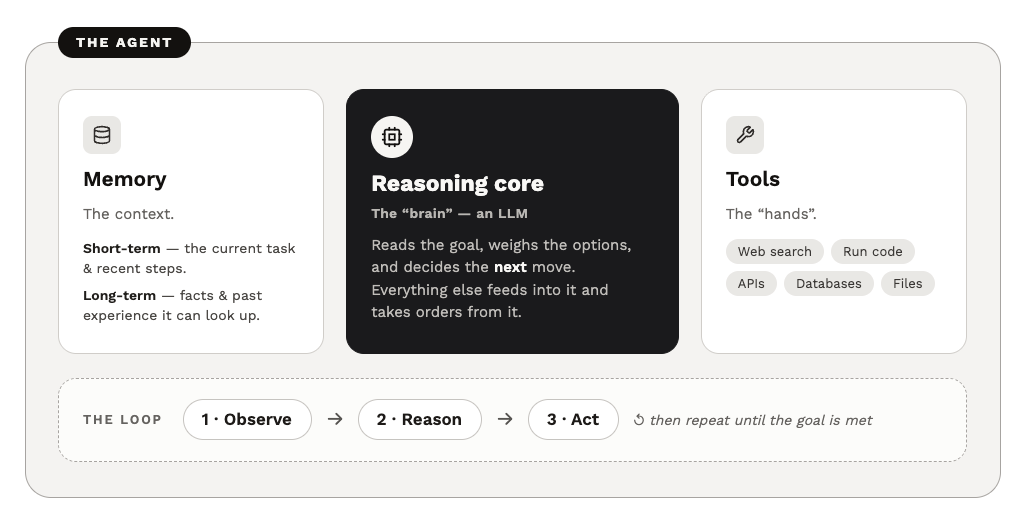 Agent architecture with memory, a reasoning core, tools, and an observe-reason-act loop
Here is the entire pattern in plain Python, no framework at all:
def run_agent(client, goal, tools, tool_impls, max_steps=10):
    messages = [{"role": "user", "content": goal}]

    for _ in range(max_steps):
        response = client.messages.create(
            model="claude-sonnet-5",
            messages=messages,
            tools=tools,
            max_tokens=2048,
        )
        messages.append({"role": "assistant", "content": response.content})

        if response.stop_reason in {"end_turn", "refusal"}:
            return response

        if response.stop_reason != "tool_use":
            raise RuntimeError(
                f"agent stopped unexpectedly: {response.stop_reason}"
            )

        tool_calls = [b for b in response.content if b.type == "tool_use"]
        if not tool_calls:
            raise RuntimeError("tool_use stop without a client tool call")

        results = []
        for call in tool_calls:
            output = tool_impls[call.name](**call.input)
            results.append({
                "type": "tool_result",
                "tool_use_id": call.id,
                "content": str(output),
            })
        messages.append({"role": "user", "content": results})

    raise RuntimeError("agent did not finish within step budget")
The frameworks in this article add streaming, retries, typed tool schemas, multi-agent routing, persistence, and observability around this loop.
The model controls only the decisions delegated to it. Inside the loop, the model chooses whether and how to use tools. The application still owns deterministic routing, permissions, and terminal conditions. Context contains only the state visible to the model. Complete system state also includes workflow state, external stores, tool-side data etc. Debugging requires inspecting both the model context and the state.
Popular choices
We split them, opinionatedly, into two groups. The first group covers cloud-neutral frameworks, they are platform agnostic.
| Framework | Core abstraction | When to use |
|---|---|---|
| Raw provider SDK | The message loop | One agent, a few tools, you want full control and no magic |
| Claude Agent SDK | Agent harness with built-in tools (files, shell, MCP) | Coding and computer-use agents; you want the harness Claude Code is built on |
| OpenAI Agents SDK | Agents + handoffs | Multi-agent handoffs with minimal boilerplate |
| LangChain / LangGraph | High-level create_agent over a typed state graph | Fast start that drops down to branching control flow, persistence, human-in-the-loop, resumability |
| Pydantic AI | Typed agent with structured output | The agent feeds a downstream system and outputs must validate |
| CrewAI | Roles and tasks | Multi-agent collaboration expressed as a team of specialists |
The second group covers cloud pairings: an open-source SDK alongside a managed platform for running and operating agents:
| Cloud | Open-source SDK | Managed run-and-operate platform | Notable for |
|---|---|---|---|
| Azure | Microsoft Agent Framework (AIAgent + sessions) | Foundry Agent Service | Mature .NET and Python APIs; Go in preview; Entra auth and Foundry integration |
| AWS | Strands Agents (@tool functions) | Bedrock AgentCore | Framework-agnostic runtime, memory, policy guardrails |
ADK (sub_agents, multi-language) | Gemini Enterprise Agent Platform (Agent Runtime, ex-Vertex AI) | Strong multi-agent and the A2A protocol | |
| Alibaba | AgentScope / Qwen-Agent | Model Studio (Bailian) | Qwen models; China-market deployments |
Several managed agent platforms can host agents built with frameworks other than their cloud's preferred SDK, so the framework and deployment decisions are partly separable. Support depth varies: a platform may provide first-class integration for its own SDK, supported templates for selected frameworks, and container-based or custom integration for everything else. If you already run on one of these clouds, its SDK is usually the simplest place to start.
The frameworks in the first table have commercial companions too. LangSmith now spans observability, evaluation, and managed deployment; Logfire covers observability for Pydantic AI; and the OpenAI dashboard includes tracing.
LangGraph and LangSmith Deployment are frequently confused. LangGraph is the open-source orchestration library that runs inside your application. LangSmith Deployment, formerly called LangGraph Platform, is a separate managed runtime for operating LangGraph applications and agents built with other frameworks.
The build-vs-framework decision
Our rule is to use the raw SDK for a single agent with a handful of tools and a well-understood task. A framework becomes useful when the system needs persistence across turns, multi-agent coordination, human-in-the-loop pause and resume, or branches with retries. Implementing those capabilities correctly takes considerably more work than implementing the model loop itself.
Teams still need to understand the underlying loop. Treating the framework as a black box makes failures in tool selection, context construction, and termination difficult to diagnose.
Application-layer frameworks, in code
The comparison uses a small support-triage agent. Given a customer message, it looks up the customer's account, checks recent orders, and either drafts a reply or recommends human escalation. The Claude Agent SDK and CrewAI are omitted here: the raw loop above already demonstrates the Anthropic API that the Claude SDK wraps, and CrewAI's value is in multi-agent role orchestration rather than single-agent tool use.
Here are the two business operations that each implementation will expose as tools:
def customer_scope() -> dict:
    user = authenticated_user()  # trusted request context, not model input
    return {"tenant_id": user.tenant_id, "customer_id": user.customer_id}

def lookup_account() -> dict:
    """Return the authenticated customer's account status and plan."""
    return db.accounts.find_one(customer_scope()) or {"status": "unknown"}

def recent_orders(limit: int = 5) -> list[dict]:
    """Return the authenticated customer's recent orders, newest first."""
    return db.orders.find(**customer_scope(), sort="-created_at", limit=limit)
authenticated_user() represents identity established by the application before the agent run. It is request-scoped and unavailable to the model. In production, pass this identity through the framework's local run context; the Pydantic AI example below shows that shape, and every framework here has an equivalent. Whichever you use, every tool must still enforce tenant and resource scope when it executes.
 The OpenAI Agents SDK
The Agents SDK leans on Python type hints: you decorate a function, and the schema the model sees is generated from the signature and docstring. The agent is an object with instructions and a tool list; a Runner drives the loop.
from agents import Agent, Runner, function_tool

@function_tool
def lookup_account() -> dict:
    """Return the authenticated customer's account status and plan."""
    return db.accounts.find_one(customer_scope()) or {"status": "unknown"}

@function_tool
def recent_orders(limit: int = 5) -> list[dict]:
    """Return the authenticated customer's recent orders, newest first."""
    return db.orders.find(**customer_scope(), sort="-created_at", limit=limit)

triage = Agent(
    name="support-triage",
    instructions=(
        "Triage the customer's message. Look up their account and recent "
        "orders. Draft a reply for routine issues; recommend human escalation "
        "for billing disputes or account-security issues."
    ),
    tools=[lookup_account, recent_orders],
)

result = Runner.run_sync(triage, "Where is my order?")
print(result.final_output)
The code is pretty compact. Handoffs between agents are first-class (an agent can hand a conversation to another agent), and the schema-from-signature approach means your tools and their contracts stay in one place.
 LangChain / LangGraph
As of the 1.0 releases (October 2025), LangChain is the high-level entry point and LangGraph is the durable runtime it is built on. The high-level API is create_agent, which is the article's loop:
from langchain.agents import create_agent
from langchain_core.tools import tool

@tool
def lookup_account() -> dict:
    """Return the authenticated customer's account status and plan."""
    return db.accounts.find_one(customer_scope()) or {"status": "unknown"}

@tool
def recent_orders(limit: int = 5) -> list[dict]:
    """Return the authenticated customer's recent orders, newest first."""
    return db.orders.find(**customer_scope(), sort="-created_at", limit=limit)

agent = create_agent(
    model="anthropic:claude-sonnet-5",
    tools=[lookup_account, recent_orders],
    system_prompt=(
        "Triage the customer's message. Look up their account and recent "
        "orders. Draft a reply for routine issues; recommend human escalation "
        "for billing disputes or account-security issues."
    ),
)

result = agent.invoke({
    "messages": [{"role": "user", "content": "Where is my order?"}]
})
print(result["messages"][-1].content)
Version 1.0 added middleware hooks to the agent loop. Built-in middleware covers human approval, conversation summarisation, and PII redaction, and custom hooks can implement application-specific policies.
Underneath, LangGraph is where you go when you need a checkpoint the model pauses at, a branch that routes billing questions down a different path, or durable state that survives a process restart. It models the workflow as an explicit state graph: nodes are steps, edges are transitions, and typed state flows through. It also provides durable persistence and resumption after an interruption. A compiled create_agent agent can be composed inside a larger StateGraph, so teams can add deterministic routing around the loop without discarding the existing agent.
 Pydantic AI
Pydantic AI focuses on typed inputs and outputs. You declare the agent's result as a Pydantic model; the framework requests structured output and validates it. This is especially useful when another system consumes the result. The typing extends to the run context: deps_type declares what each tool receives, the caller supplies it at run_sync, and tools read the authenticated scope from ctx.deps instead of a global.
from dataclasses import dataclass
from typing import Literal

from pydantic import BaseModel
from pydantic_ai import Agent, RunContext

@dataclass
class Deps:
    tenant_id: str
    customer_id: str

class Triage(BaseModel):
    action: Literal["reply", "escalate"]
    draft: str
    reason: str

agent = Agent(
    "anthropic:claude-sonnet-5",
    deps_type=Deps,
    output_type=Triage,
    system_prompt=(
        "Triage the customer's message. Look up their account and recent "
        "orders. Reply to routine issues; classify billing disputes or "
        "account-security issues for human escalation."
    ),
)

@agent.tool
def lookup_account(ctx: RunContext[Deps]) -> dict:
    """Return the authenticated customer's account status and plan."""
    return db.accounts.find_one(vars(ctx.deps)) or {"status": "unknown"}

@agent.tool
def recent_orders(ctx: RunContext[Deps], limit: int = 5) -> list[dict]:
    """Return the authenticated customer's recent orders, newest first."""
    return db.orders.find(**vars(ctx.deps), sort="-created_at", limit=limit)

result = agent.run_sync("Where is my order?", deps=Deps(**customer_scope()))
print(result.output)
Cloud-platform SDKs, in code
 Azure — Microsoft Agent Framework
If your stack is .NET or you are already committed to Azure, Microsoft Agent Framework, the successor of Semantic Kernel and AutoGen, is a natural candidate. It provides mature .NET and Python APIs, with Go in public preview, and integrates with Entra ID, Microsoft Foundry, MCP, and human approval for tool calls.
using System.ComponentModel;
using System.Text.Json;
using Azure.AI.Projects;
using Azure.Identity;
using Microsoft.Agents.AI;
using Microsoft.Extensions.AI;

[Description("Return the authenticated customer's account status and plan.")]
static string LookupAccount()
    => Db.Accounts.FindOne(Auth.CustomerScope())?.ToString()
        ?? """{"status":"unknown"}""";

[Description("Return the authenticated customer's recent orders.")]
static string RecentOrders(
    [Description("Maximum number of orders")] int limit = 5)
    => JsonSerializer.Serialize(
        Db.Orders.Find(Auth.CustomerScope(), limit));

AIAgent agent = new AIProjectClient(new Uri(endpoint), new DefaultAzureCredential())
    .AsAIAgent(
        model: deployment,
        name: "support-triage",
        instructions: "Triage the customer's message. Look up their account "
            + "and recent orders. Recommend human escalation for billing "
            + "disputes or account-security issues.",
        tools: [
            AIFunctionFactory.Create(LookupAccount),
            AIFunctionFactory.Create(RecentOrders),
        ]);

AgentSession session = await agent.CreateSessionAsync();
Console.WriteLine(await agent.RunAsync("Where is my order?", session));
AIAgent defines the agent, AIFunctionFactory.Create turns a described method into a tool, and AgentSession maintains context across calls. Depending on the provider, the underlying history can live in memory or in the model service. One agent can become a tool for another via .AsAIFunction(), and the abstraction can target Azure OpenAI, OpenAI, or Claude.
 AWS — Strands Agents
Strands uses plain @tool functions and the Bedrock provider by default. The same agent can then be deployed to Bedrock AgentCore for managed runtime, memory, and observability.
# pip install strands-agents
from strands import Agent, tool

@tool
def lookup_account() -> dict:
    """Return the authenticated customer's account status and plan."""
    return db.accounts.find_one(customer_scope()) or {
        "status": "unknown",
    }

@tool
def recent_orders(limit: int = 5) -> list[dict]:
    """Return the authenticated customer's recent orders, newest first."""
    return db.orders.find(
        **customer_scope(),
        sort="-created_at",
        limit=limit,
    )

agent = Agent(
    model="global.anthropic.claude-sonnet-5",
    system_prompt=(
        "Triage the customer's message. Look up their account and recent "
        "orders. Draft a reply for routine issues. Recommend human escalation "
        "for billing disputes or account-security issues."
    ),
    tools=[lookup_account, recent_orders],
)

result = agent("Where is my order?")
print(result)
 Google — ADK
Tools are ordinary functions whose docstrings become their descriptions. ADK provides the agent abstraction, while Google's current developer workflow uses Agents CLI: agents-cli run for a terminal invocation and agents-cli playground for the local chat UI. Agents CLI can also deploy the application to Agent Runtime within Gemini Enterprise Agent Platform. Google retained the underlying ReasoningEngine resource naming for backward compatibility.
# pip install google-adk google-agents-cli
from google.adk.agents import Agent
from google.adk.apps import App
from google.adk.models import Gemini

def lookup_account() -> dict:
    """Return the authenticated customer's account status and plan."""
    return db.accounts.find_one(customer_scope()) or {"status": "unknown"}

def recent_orders(limit: int = 5) -> list[dict]:
    """Return the authenticated customer's recent orders, newest first."""
    return db.orders.find(
        **customer_scope(),
        sort="-created_at",
        limit=limit,
    )

root_agent = Agent(
    name="support_triage",
    model=Gemini(model="gemini-flash-latest"),
    description="Triage customer support messages.",
    instruction=(
        "Triage the customer's message. Look up their account and recent "
        "orders. Recommend human escalation for billing disputes."
    ),
    tools=[lookup_account, recent_orders],
)

app = App(
    name="support_triage",
    root_agent=root_agent,
)
 Alibaba — AgentScope
ReActAgent runs the loop with support of Toolkit for tools and DashScope providing Qwen models. AgentScope also supports multi-agent handoffs when needed.
# pip install agentscope
import asyncio
import json
import os

from agentscope.agent import ReActAgent
from agentscope.formatter import DashScopeChatFormatter
from agentscope.memory import InMemoryMemory
from agentscope.message import Msg, TextBlock
from agentscope.model import DashScopeChatModel
from agentscope.tool import Toolkit, ToolResponse


def lookup_account() -> ToolResponse:
    """Return the authenticated customer's account status and plan."""
    account = db.accounts.find_one(customer_scope()) or {
        "status": "unknown",
    }
    return ToolResponse(
        content=[
            TextBlock(
                type="text",
                text=json.dumps(account, default=str),
            ),
        ],
    )


def recent_orders(limit: int = 5) -> ToolResponse:
    """Return the authenticated customer's recent orders, newest first.

    Args:
        limit (int):
            Maximum number of orders to return.
    """
    orders = list(
        db.orders.find(
            **customer_scope(),
            sort="-created_at",
            limit=limit,
        ),
    )
    return ToolResponse(
        content=[
            TextBlock(
                type="text",
                text=json.dumps(orders, default=str),
            ),
        ],
    )


toolkit = Toolkit()
toolkit.register_tool_function(lookup_account)
toolkit.register_tool_function(recent_orders)

agent = ReActAgent(
    name="support-triage",
    sys_prompt=(
        "Triage the customer's message. Look up their account and recent "
        "orders. Draft a reply for routine issues. Recommend human escalation "
        "for billing disputes or account-security issues."
    ),
    model=DashScopeChatModel(
        model_name="qwen3-max",
        api_key=os.environ["DASHSCOPE_API_KEY"],
        stream=False,
    ),
    formatter=DashScopeChatFormatter(),
    memory=InMemoryMemory(),
    toolkit=toolkit,
)


async def main() -> None:
    response = await agent(
        Msg(
            name="customer",
            content="Where is my order?",
            role="user",
        ),
    )
    print(response.get_text_content())


asyncio.run(main())
The SDK syntax changes, but most domain-specific work remains in tools, state, evaluation, and safeguards. They also can be mixed: for example, a LangGraph graph can call agents built with provider SDKs from its nodes and use Pydantic to validate their structured outputs.
Tools bring contract and direction
Model choice affects tool use, safety, latency, and cost, even when providers expose similar capabilities. Tools, proprietary data, permissions, and operating practices are more durable. Be aware of these points:
Write descriptions that explain when to use a tool. Improving descriptions often fixes tool-selection errors without a broader prompt rewrite. "Return the customer's most recent orders, newest first" is better than
get_orders(e, l).Keep the tool count small. Overlapping tools create ambiguous choices and unnecessary calls. If an agent needs access to thirty capabilities, group related operations behind fewer, higher-level tools where the security and error-handling requirements allow it.
Validate inside every tool. Tool arguments can be malformed, out of range, or adversarial. The model's call is untrusted input.
Return actionable errors. When a tool fails, return a message the model can act on ("no account found for that email; ask the user to confirm it"). Otherwise, the model may repeat the same call without learning how to recover.
Before changing the prompt to address a failed run, check whether the tool result described the failure and the available recovery path clearly.
When to use the Model Context Protocol
You write MCP server as a wrapper around internal APIs once, and it is usable by any MCP-capable agent. Use it when a capability must be shared across agents, languages, processes, or deployment boundaries. For tools used only inside one application, an in-process function is often simpler, faster, and easier to secure.
Memory and state
The raw loop kept the entire history in one list. That stops working when the conversation outgrows the context window or must survive a restart. Here, "memory" refers to two different systems:
Working memory is the current task's context: the message list. As tool results accumulate, older turns may need to be summarised or pruned to keep the agent focused and costs bounded. A popular pattern is to keep the last N turns verbatim and replace earlier ones with a running summary.
Long-term memory persists across sessions and may include user preferences, past resolutions, and learned facts. The agent retrieves relevant records into context at the start of a task, often using the same machinery as a RAG pipeline, and writes new records after the task. Loading the entire store into every prompt increases latency and cost while making relevant details harder for the model to identify.
Every framework has an opinion about working memory because it is part of the loop. Most leave long-term memory largely open.
| Framework | Working memory | Long-term memory, natively |
|---|---|---|
| Raw provider SDK | The list you own | Bring your own |
| Claude Agent SDK | Session state the harness manages, plus the filesystem as scratch space | Bring your own, though an agent that can write files will happily keep notes on disk |
| OpenAI Agents SDK | Sessions, with a SQLite implementation in the box | Bring your own |
| LangChain / LangGraph | Checkpointers, durable and resumable | A store interface, backends swappable |
| Pydantic AI | Message history you pass back in explicitly | Bring your own |
| CrewAI | Crew execution context; memory is opt-in for crews | Unified Memory API with automatic extraction and recall when enabled |
| Microsoft Agent Framework | AgentSession, with in-memory or provider-managed history | Context providers or managed Foundry memory |
| Strands Agents | Conversation manager with a sliding window | Bring your own, or AgentCore Memory |
| Google ADK | Session service | Memory service, an interface with a managed implementation behind it |
| AgentScope | InMemoryMemory, with optional conversation compression | Long-term memory integrations, including Mem0LongTermMemory, with agent- or application-controlled recall |
Use persistent checkpoints when runs must survive process restarts or long approval delays.
CrewAI and AgentScope provide higher-level long-term memory workflows inside their agent abstractions. For crews, memory is opt-in with memory=True; once enabled, CrewAI recalls relevant context before tasks and extracts memories from task output afterward. AgentScope supports application-controlled, agent-controlled, or combined recording and retrieval through pluggable long-term memory implementations.
A custom long-term memory implementation can begin with a retrieval step at task start and a write step at task end. This narrow interface allows community memory layers to integrate with most frameworks without taking over the agent loop.
| Library | Shape | Consider it when |
|---|---|---|
| Mem0 | Extraction and consolidation over a vector store, framework-agnostic, with a broad integration list | The default first try, especially for per-user personalisation |
| Zep | Managed temporal knowledge-graph memory | You want Zep's hosted memory service |
| Graphiti | Open-source temporal knowledge-graph framework | "As of when" matters and you need a self-hosted temporal memory layer |
| LangMem | Memory SDK from the LangChain team | You are already on LangGraph and want the store you already have |
| Cognee | Graph plus vector pipeline with an explicit ingestion step | Memory blurs into a document corpus and you want one pipeline for both |
Note also that conventional storage is sufficient for many agents: Postgres with pgvector for memory records, Postgres or SQLite for checkpoints, and Redis for a fast working set. This setup runs across clouds and keeps the data directly queryable. The libraries above become useful when you need extraction logic that decides what is worth retaining from a transcript. Mem0, Graphiti, LangMem, and Cognee can be self-hosted. Zep is the managed offering; its former Community Edition is deprecated and unsupported.
Managed services such as AgentCore Memory, Gemini platform memory, and hosted conversation state package similar capabilities and can reduce operational work for teams already committed to those clouds. Before adopting one, test how records, metadata, and embeddings can be exported. Unlike transient model context, long-term memory accumulates data over months, so migration limits become more expensive over time.
Evaluation and observability
Build evaluation before production. Without it, a change to a prompt/model/tool cannot be assessed against previous behaviour.
Important blocks:
A traced view of every run. Capture the messages, tool calls and arguments, tool results, latency, and token count for each step. These records allow an engineer to locate the failed decision instead of reconstructing it from the final answer. Traces frequently contain user data, retrieved documents, credentials, and sensitive tool results, so redact sensitive fields, restrict access, and set an explicit retention policy rather than enabling full-payload production logging by default. LangSmith, OpenAI Agents SDK tracing, and the OpenTelemetry feeds emitted by cloud platforms are common implementations. Other frameworks need equivalent structured tracing before production.
A small evaluation set of real tasks with known-good outcomes. Start small. Add production failures, security cases, and difficult edge conditions as they appear. Because model behaviour varies between runs, execute multiple trials for important cases. Evaluate the final outcome first, then inspect the trajectory for safety and policy compliance. When several tool sequences are valid, test for dangerous or wasteful behaviour. This applies the golden dataset approach to agent outcomes and tool-use traces.
def evaluate(agent, cases, trials_per_case=3):
    results = []
    for case in cases:
        for trial in range(trials_per_case):
            trace = run_with_tracing(agent, case["input"])
            results.append({
                "case": case["name"],
                "trial": trial + 1,
                "passed": case["check"](trace.final_output),
                "steps": len(trace.steps),
                "tools_used": [s.tool for s in trace.steps if s.tool],
                "cost": trace.total_cost,
            })
    return summarise(results)  # pass rate, median steps, cost per task
Track pass rate, median steps, and cost per task over time. These measurements show whether a model upgrade reduces steps without lowering quality or a prompt change increases cost.
Production hardening
Preparing production for probabilistic systems is harder than for traditional software. Frameworks bring middleware, approvals, and tracing primitives; the policies and risk thresholds are still your responsibility:
Set hard run limits. Configure a maximum step count, per-run token budget, and wall-clock timeout. Without these limits, a failed tool interaction can repeat until the provider or budget stops it.
Gate tools according to risk. A read that exposes credentials, financial records, or cross-tenant data can be more dangerous than a reversible write. Require authorisation on every call and approval when necessary. Make consequential writes reversible where possible.
Enforce identity and authorisation inside every tool. The model may propose an action, but it must never decide whether the caller is allowed to perform it. Re-check user identity and permissions at execution time.
Make consequential actions idempotent and auditable. Use idempotency keys for refunds, messages, and other side effects. Record who requested the action, what the agent proposed, which policy or human approved it, and what was changed.
Handle model, tool, and format failures separately. Providers rate-limit and have outages, tools throw exceptions, and model output sometimes fails to parse. Each failure class needs its own retry-or-fail policy. One
try/exceptaround the entire loop hides which component failed and whether retrying is safe.Beware of prompt injection. Untrusted content such as a support email, web page, or document can attempt to redirect the agent. Scope tool permissions tightly, keep retrieved text separate from trusted instructions, and require approval for consequential actions. An agent that can both read attacker-controlled input and send email needs controls around recipients, content, and approval.
How to choose
Start with the smallest abstraction that fits the job. A raw provider SDK is usually enough for one agent and a few tools. Look for your cloud propositions if your company is already on such a platform, and look into popular community choices such as LangGraph or Pydantic if your system needs validation or durable state.
Add a new agent when the work requires separate context or parallel execution. For the orchestration patterns, see agent workflow patterns.
References and further reading
Anthropic, Building effective agents - the case for starting simple and adding structure only when the problem demands it.
Model Context Protocol - the open standard for exposing tools and data to agents across frameworks.
LangSmith evaluation concepts - guidance on curated datasets, offline regression testing, and incorporating production traces into evaluations.
LangSmith evaluation repetitions - why repeated trials give a more reliable estimate for nondeterministic agent behaviour.
OWASP Top 10 for Agentic Applications 2026 - the principal risks and mitigations for agents that plan, use tools, and act autonomously.
MCP security best practices - authorisation, least-privilege, session, sandboxing, and transport guidance for MCP implementations.