The category is finally becoming real
For years, cloud migration tooling focused on infrastructure: discover servers, replicate virtual machines, move databases, and rebuild networks. Code migration was still mostly consulting work. A team would read migration guides, apply mechanical changes, fix compile errors, run tests, and repeat that process across dozens or hundreds of applications.
The major cloud providers have started shipping AI-assisted modernization services that inspect code, generate migration plans, apply transformations, and help teams move applications onto their cloud platforms.
The important word is assist. These services are not magic buttons for rewriting a portfolio. They are migration accelerators: useful when the migration target is well understood, the codebase is buildable, and the engineering team keeps ownership of review, testing, security, and architecture decisions.
This comparison looks at the current offerings from AWS, Microsoft Azure, and Google Cloud, and where each one fits.
What counts as a code migration service
We are not comparing general coding assistants here. A normal coding assistant can help an engineer update a file. A code migration service does something more structured:
Assesses the application, dependencies, runtime, framework, and cloud-readiness blockers
Plans a migration path with tasks, risks, and recommended target services
Transforms source code, configuration, dependencies, infrastructure files, or deployment assets
Validates the output through builds, tests, vulnerability checks, or human review checkpoints
Scales the same migration pattern across many repositories or applications
Scale is the part that decides the business case. Most enterprise migration cost sits in the 80 similar-but-not-identical applications where the same upgrade pattern has to be repeated without losing local nuance, not in the one hard app everyone worries about.
The short version
| Provider | Primary product | Best fit | Strongest angle | Main limitation |
|---|---|---|---|---|
| AWS | AWS Transform / Amazon Q Developer transformation | AWS-first modernization of Java, .NET, mainframe, and VMware workloads | Portfolio-scale transformation with agentic migration workflows | Strongly optimized for AWS target patterns and specific workload families |
| Microsoft Azure | GitHub Copilot modernization | Java and .NET apps moving to Azure, especially GitHub/Copilot teams | Developer workflow integration, Azure migration tasks, custom skills | Scope is still concentrated around Java and .NET app modernization |
| Google Cloud | Gemini Code Assist Enterprise + Code Modernization for .NET | Teams already standardizing on Google Cloud and Gemini-assisted development | Private-repo context, code customization, Google Cloud-wide assistance | Migration-specific transformation tooling is narrower than AWS or Azure |
If you need a quick decision rule: AWS is strongest for migration factory work, Azure is strongest when the developer workflow already runs through GitHub and Copilot, and Google Cloud is strongest when modernization is part of a broader Gemini-assisted engineering platform.
Published proof points
The public evidence is not evenly distributed across providers.
 Cloud code migration services: public evidence and best fit
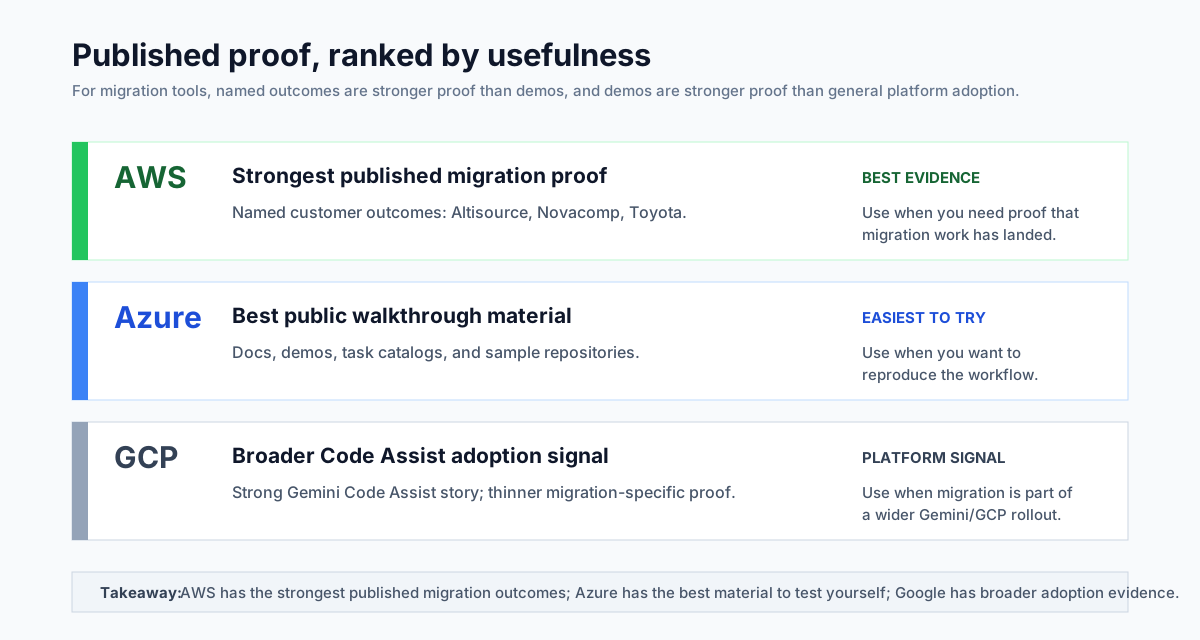
AWS has the clearest named customer stories. Altisource reports modernizing 350,000 lines of legacy Java with Amazon Q Developer, increasing developer productivity by 25%, delivering four new applications in four months, and reducing code vulnerabilities by 54%. Novacomp reports upgrading a 10,000-line Java 8 project to Java 17 in 50 minutes instead of an estimated three weeks. Toyota's AWS Transform story is framed around generative AI-assisted mainframe migration, including code analysis, business logic documentation, migration planning, and functional-equivalence testing.
Azure has strong product examples, but fewer named modernization case studies. Microsoft and GitHub publish detailed walkthroughs, sample repositories, and task catalogs for GitHub Copilot modernization. The public examples include repositories such as PhotoAlbum-Java, PhotoAlbum, and eShopOnWeb for batch assessment, plus step-by-step Java modernization demos. Microsoft also says the feature was tested on hundreds of open-source repositories and used with customers during Technical Preview, but the public proof is mostly product-led rather than named-customer-led.
Google Cloud has Code Assist adoption stories, but fewer migration-specific wins. Delivery Hero is a strong Gemini Code Assist customer story: the tool is enabled across more than 15,000 repositories and used by more than 4,000 engineers and data scientists. That is good evidence for broad code-assistance adoption, code review, onboarding, and brownfield understanding. It is weaker evidence for dedicated code migration. Google's Code Modernization for .NET documentation is concrete, but the tool still requires allowlist access and does not yet have the same volume of public customer proof as AWS.
So the trust level is different: AWS has the most concrete published migration outcomes, Azure has the most reproducible public walkthrough material, and Google has the strongest general Code Assist adoption story but a thinner migration-specific public record.
Pricing reality
Pricing is not apples-to-apples, because the providers package these capabilities differently. The numbers below are captured as of May 2026.
| Provider | Public pricing signal | What to watch |
|---|---|---|
| AWS | AWS Transform lists assessment, Windows modernization, mainframe modernization, and VMware migration as free. Custom transformation agents are paid. AWS also says AWS account resources created or used by the output are billed separately at normal AWS rates. | Good headline price for supported agents, but custom code/API/framework transformations and generated cloud resources need separate cost control. |
| Microsoft Azure | GitHub Copilot modernization is billed as part of GitHub Copilot. Copilot Business is listed at $19 per user per month and Copilot Enterprise at $39 per user per month, with additional premium requests available at $0.04 per request. Modernization tasks consume premium requests. | Budget for both seats and heavier migration usage. Agentic modernization can burn through request allowances faster than ordinary autocomplete or chat. |
| Google Cloud | Gemini Code Assist Standard is listed at about $22.80 per license per month on a monthly commitment, or $19 with a 12-month commitment. Enterprise is about $54 monthly, or $45 with a 12-month commitment. Google publishes this as hourly license pricing, billed monthly. | The migration story is effectively tied to Gemini Code Assist packaging. Enterprise features such as code customization may be the real cost driver for large organizations. |
The practical takeaway: AWS can look cheapest for the supported migration agents, Azure is easiest to model if you already understand Copilot seat and request usage, and Google is clearest as a per-license developer platform cost. In all three cases, the tool price is only one part of the business case. The bigger cost is still engineering review, test remediation, target-cloud infrastructure, security sign-off, and the migration waves that fail the happy path.
AWS: AWS Transform and Amazon Q Developer
AWS has the most explicit migration-service positioning. AWS Transform is a service for transforming infrastructure, applications, and code through an agentic AI experience. It supports modernization and migration for mainframe workloads, VMware workloads, .NET applications, and migration-readiness assessment.
For code-level modernization, AWS also has Amazon Q Developer transformation capabilities, especially around Java upgrades and .NET porting.
What it handles well
Java upgrades. Amazon Q Developer can upgrade Java applications across supported Java versions, including common enterprise moves from Java 8 or 11 to newer LTS versions. It analyzes the project, creates a transformation plan, applies code and dependency updates, and asks the developer to review the proposed diff.
.NET modernization. AWS Transform for .NET is aimed at moving Windows-dependent .NET Framework applications toward Linux-ready, cross-platform .NET. That matters because Linux deployment can reduce licensing cost and opens the path to containers, ECS, EKS, and other AWS-native deployment options.
Mainframe modernization. AWS Transform targets IBM z/OS and Fujitsu GS21 modernization scenarios. This is not a casual refactor. The value is in discovery, decomposition, generated artifacts, and human-in-the-loop modernization planning for a category where manual analysis is expensive.
VMware migration. This is less about application source code and more about translating infrastructure and network context into AWS migration plans. It belongs in the comparison because many enterprise modernization programs combine code migration, dependency mapping, and platform migration in the same portfolio.
Where AWS is strongest
AWS reads most like a migration-program tool rather than a developer-only assistant. The product language is about workspaces, jobs, plans, artifacts, collaborator requests, and human approval. That maps well to portfolios where a central team needs to track waves, evidence, and exceptions.
Use it after the target AWS operating model is mostly settled. It is better at industrializing known migration paths than at deciding whether AWS should be the destination in the first place.
Where AWS is weaker
AWS is not trying to be a neutral migration layer, and unsupported application re-architecture still needs engineers and architects in the loop. Treat the generated output as an AWS-shaped proposal to review, not a provider-agnostic modernization plan.
Azure: GitHub Copilot modernization
Microsoft's offering is GitHub Copilot modernization: an agentic solution for analyzing, upgrading, and migrating Java and .NET applications to Azure.
The architecture is split across two layers. Architects and application owners can use a modernization agent through the Modernize CLI for assessment and planning across multiple applications. Developers then use the IDE experience to execute transformations, migrate dependencies to Azure services, containerize applications, generate infrastructure-as-code, and deploy.
What it handles well
Java and .NET upgrades. GitHub Copilot modernization supports language and framework upgrades for Java and .NET. For Java, it uses migration tooling such as OpenRewrite alongside AI-assisted tasks. This is sensible: deterministic rewrite tools do the mechanical work, while the agent handles planning, code context, and remediation.
Azure service migration. The Azure-specific migration tasks are a key differentiator. The tool can help with changes like moving secrets to Azure Key Vault, adapting messaging integrations, using Azure identity services, containerizing workloads, and preparing deployment assets for Azure services.
Custom migration patterns. One of the more interesting capabilities is turning prior Git commits into reusable migration patterns. If your team manually migrated one application from a legacy queue to Azure Service Bus, that pattern can inform future migrations instead of living only in a confluence page and someone's memory.
Developer review loop. The product is explicit that humans remain in the loop and every recommendation should be transparent, reviewable, and validated. That aligns with how teams need to adopt migration automation without breaking trust.
Where Azure is strongest
Azure is strongest when your engineering organization already uses GitHub, GitHub Copilot, VS Code, Visual Studio, and Azure. The modernization work appears inside the developer workflow rather than as a separate migration platform that only a transformation office touches.
It is also strong for repeatable enterprise app modernization where the target is not just a newer runtime, but an Azure-native operating model: App Service, Azure Container Apps, AKS, Key Vault, managed messaging, identity, and infrastructure-as-code.
Where Azure is weaker
Outside Java and .NET, expect Copilot to behave more like a capable coding assistant than a packaged modernization service. Mixed portfolios will still need a separate inventory, planning, and governance layer.
The Modernize CLI assessment and planning layer is also newer than the IDE experience. For large portfolios, treat it as something to pilot before you depend on it as the system of record for a migration factory.
Google Cloud: Gemini Code Assist and Code Modernization for .NET
Google Cloud's story is more distributed. Gemini Code Assist Standard and Enterprise provide AI assistance across the software development lifecycle, with IDE support, agentic chat, local codebase awareness, and Google Cloud integrations. Gemini Code Assist Enterprise adds code customization, which indexes private repositories so suggestions align with an organization's codebase and patterns.
For a more migration-specific tool, Google offers Code Modernization for .NET, powered by Gemini models. It helps refactor Windows-dependent .NET Framework applications into cross-platform .NET code.
What it handles well
Organization-specific coding assistance. Gemini Code Assist Enterprise's code customization is useful for modernization because migration work is rarely generic. Teams need generated changes to follow internal libraries, wrappers, naming conventions, deployment templates, and platform rules.
Google Cloud-integrated development. Gemini assistance appears across Google Cloud surfaces such as Cloud Shell Editor, Cloud Workstations, Apigee, Application Integration, BigQuery, and Cloud Run-related workflows. That helps teams modernize around the broader Google Cloud platform rather than only editing source files.
.NET Windows-to-Linux modernization. Code Modernization for .NET targets a common enterprise problem: moving .NET Framework applications away from Windows dependencies toward cross-platform .NET, which can then be containerized or deployed in more cloud-native ways.
Where Google Cloud is strongest
Google Cloud is most compelling when migration depends on company-specific code patterns. The private-code customization story matters for organizations with internal frameworks, wrappers, naming conventions, and deployment templates that generic migration tools will not know by default.
It also fits teams already adopting Gemini Code Assist Enterprise, Google Cloud Workstations, and Google Cloud services as one developer platform rather than a standalone migration factory.
Where Google Cloud is weaker
Google's migration-specific catalog is narrower. Code Modernization for .NET is useful, but teams should expect more setup work around project configuration, API enablement, repository indexing, and in some cases allowlist access for the .NET modernization extension.
Evaluation criteria
When comparing these services, do not start with a vendor feature table. Start with your migration portfolio.
1. Workload fit
Ask which languages, frameworks, build tools, and runtime versions are actually in scope. A service that is excellent for Java and .NET may be irrelevant to a portfolio dominated by Python, Node, or packaged enterprise software.
2. Target-cloud commitment
These tools are not neutral; they encode the target provider's platform assumptions. If the target cloud is already chosen, that is an advantage. If the cloud decision is still open, using a provider-specific migration service too early can bias the architecture before the business decision is settled.
3. Scale model
Some services are optimized for an individual developer upgrading one repo. Others are built for portfolio assessment, wave planning, and migration tracking. Enterprise migration programs need both, but you should know which layer the product is strongest in.
4. Validation depth
Code that compiles is not necessarily migrated. Look for build validation, test migration, dependency updates, CVE remediation, infrastructure generation, deployment checks, and explicit human approval points.
5. Customization
Real migration programs accumulate local patterns. You need a way to encode those patterns so the second application is easier than the first. Azure's reusable skills and Google's code customization approach are both interesting here. AWS's workspace and task model is more program-oriented.
6. Governance and auditability
Migration automation touches sensitive code and infrastructure. You need logs of what the tool read, what it changed, what humans approved, and which artifacts were produced. The more autonomous the tool, the more important this becomes.
Decision shortcuts
Start with the target cloud. These tools encode provider assumptions, so the best choice is usually the one attached to the platform you have already chosen. If platform selection is unresolved, use them for discovery carefully and keep architecture decisions outside the tool.
Match the service to the execution model. Central migration offices should care about portfolio tracking, approvals, and artifacts. Product teams should care about IDE flow, pull requests, test repair, and how easily the tool fits normal development.
Check the unsupported edge cases early. Legacy languages, packaged vendor systems, custom frameworks, strict multi-cloud neutrality, and architecture changes that cannot be reduced to repeatable transformations are where a specialist or internal migration platform may still be the better answer.
Reality checks
Before committing to any of these services, two things are worth saying out loud, because the vendor materials rarely do.
These tools fail in predictable, quiet ways. The recurring patterns are silent business-logic drift in translated code (especially mainframe and legacy Java), hallucinated dependency versions or API calls that look plausible but do not exist, security regressions in generated infrastructure (over-permissive IAM, widened security groups, weakened TLS defaults), CVE bumps that are technically applied but never functionally reached by your code paths, and test suites that still pass because the agent rewrote the tests in the same diff as the code. None of this makes the tools unsafe to use. It means the review effort belongs on logic preservation, security posture, and test fidelity, not on whether the output compiles.
Sometimes the right answer is not to migrate. Procurement pressure, end-of-support deadlines, and "AI makes it cheap now" narratives push teams to migrate applications that would be better left alone, replaced outright, or wrapped behind a stable interface and slowly retired. An application with no active development, low operational cost, and a clear retirement horizon is rarely a good migration candidate, even if the tooling could technically do it. Cheaper tooling lowers the cost of doing the migration, but not the cost of running, supporting, and re-platforming the result for the next decade, which is where most of the bill ends up.
The practical rollout pattern
 A practical rollout pattern for AI-assisted code migration
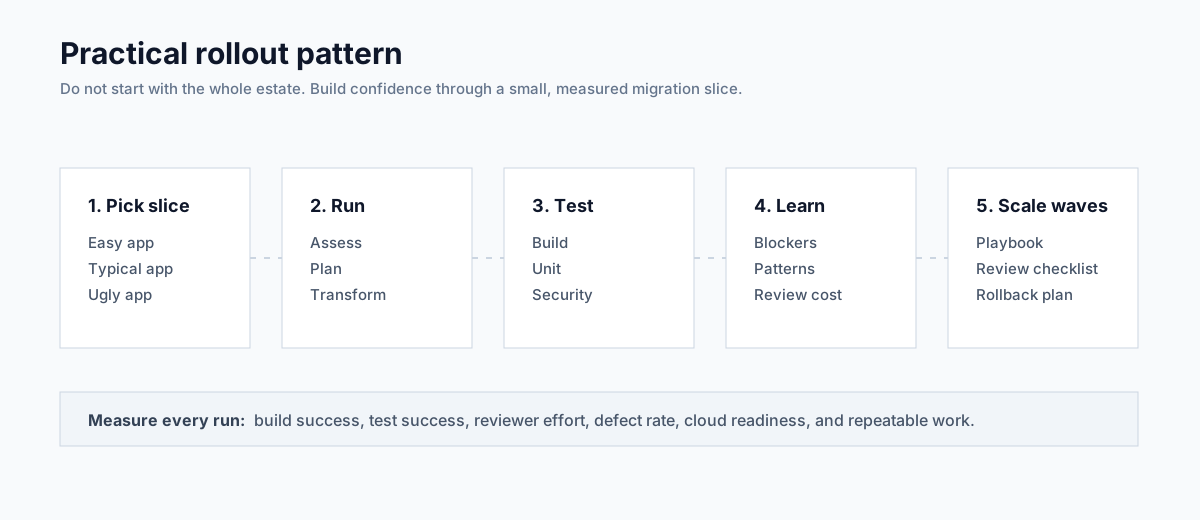
Most successful programs converge on the same starting move: a small, representative pilot before any portfolio-wide commitment. Teams that pilot on three easy apps get a green dashboard and an unpleasant surprise in wave two.
Pick three applications deliberately: one the team already knows well, one that is representative of the bulk of the portfolio, and one with the worst dependency, build, or framework mess you can find. Run the provider's migration service on all three. Measure build success, test success, reviewer effort, defect rate, cloud-readiness of the output, and how much of the work was repeatable.
Then turn what you learned into a migration playbook: supported app types, known blockers, review checklist, testing requirements, rollback plan, and when to escalate to humans. Only after that should you scale to waves of applications.
The providers are making code migration faster, but the teams that come out ahead will still be the ones that wrap an engineering system around it: a tracked portfolio, a real review loop, a working test strategy, and a clear escalation path when the agent gets it wrong.
If you're comparing code migration services for a real application portfolio, book a diagnostic. We'll map your workloads against the provider options and identify which migrations are safe to automate, which need human architecture work, and which should be left alone for now.